 |
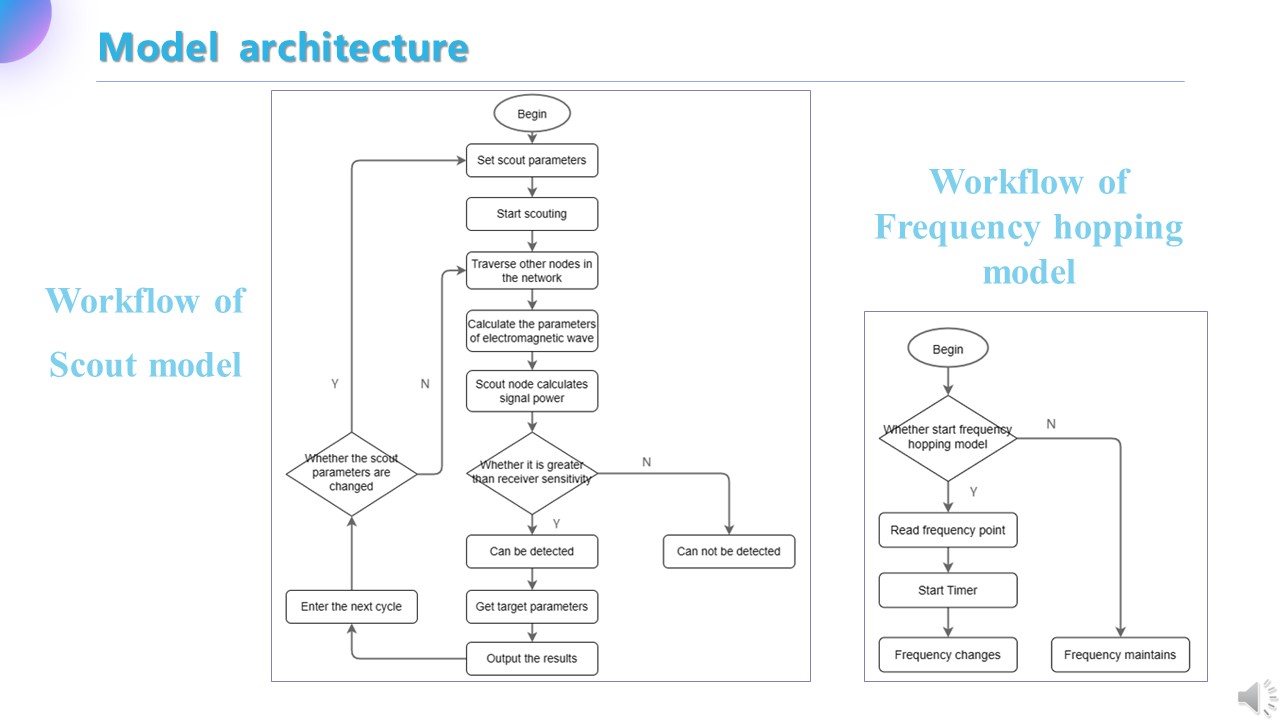
This is the workflow of scout model and frequency hopping model.
For the scout model, we need to set a node in the network as a scout node according to the simulation requirements, and configure parameters such as the working mode, interval, and working frequency before the simulation starts. After the simulation starts, the scout node will traverse the other nodes in the network and judges the communication status of the target node. If the target node is within the reconnaissance range and is in the signal transmitting state, the scout node will calculate the transmission parameters of the signal on the path from the target node to itself. When the signal reaches the scout node, the signal power need to be compared with the receiver threshold. If the signal power is greater than the receiver threshold, it is considered to be detectable. At this time, the parameters of the target node such as location, distance and communication frequency are extracted and encapsulated, and sent to the front end through the data interaction interface. After that, the scout node will enter the next cycle. While the scout node is working, the working parameters of it can be dynamically adjusted through the data interaction interface.
For the frequency hopping model, we need to set parameters such as start frequency, end frequency, time interval, and random seed in the configuration file of frequency hopping model. When the simulation begins, if frequency hopping is not enabled, the communication frequency will be fixed. If frequency hopping is enabled, the start frequency, end frequency, and time interval in the configuration file will be read, and the frequency hopping pattern will be generated based on the seed. Afterwards, the timer is started to change the network communication frequency. The frequency hopping patterns of different subnets can be different.
|
 IEEE/ICACT20240387 Slide.10
[Big Slide]
[YouTube]
IEEE/ICACT20240387 Slide.10
[Big Slide]
[YouTube]