Now 5160 visitors
Today:0 Yesterday:0
Total: 146222
215S 51P 5R
2026-10-21, Week 43 |
| Member Login |
| TACT Journal Homepage |
| Call for Paper |
| Committee |
| Find My Paper |
| Author Homepage |
| Statistics & History |
| Welcome Message |
| Paper Procedure |
| FAQ |
| Paper Archives |
| Outstanding Papers |
| Author Homepage |
| - Paper Procedure |
| - Journal Procedure |
| - Presentation Tips |
|
| Program & Proceedings |
| Program with Papers |
| Plenary Session |
| Tutorial Session |
|
| Presentation Platform |
| Hotel & Travel Info |
| About Korea |
| Accommodation |
| Transportation |
| VISA |
| Other Infomation |
|
| Photo Gallery |
| Scheduler Login |
| Seminar |
| Archives Login |
|
| Sponsors |

|

|

|

|

|

|

|

|
|

|
|
|
|
|
main_email:luabt@viettel.com.vn
| Save the slide and description |

|
*** You can edit any slide by selecting the Slide number below***
|
 ICACT20250079 Slide.17
[Big slide for presentation]
ICACT20250079 Slide.17
[Big slide for presentation]
|
Chrome Text-to-Speach Click!! Click!! |
 |
Thank you for your attention, and we welcome any questions or feedback you may have!
|
|
ICACT20250079 Slide.16
[Big slide for presentation]
|
Chrome Text-to-Speach Click!! |
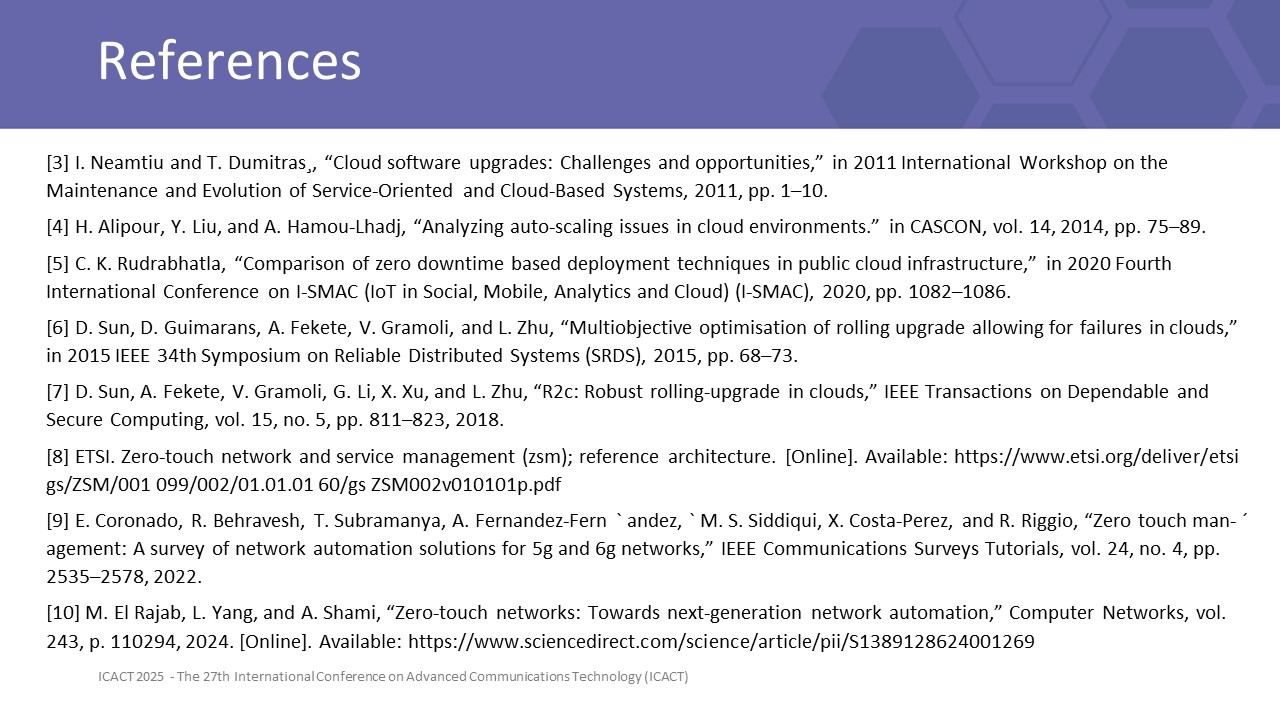 |
- Here are the references that we use in the paper.
|
|
ICACT20250079 Slide.15
[Big slide for presentation]
|
Chrome Text-to-Speach Click!! |
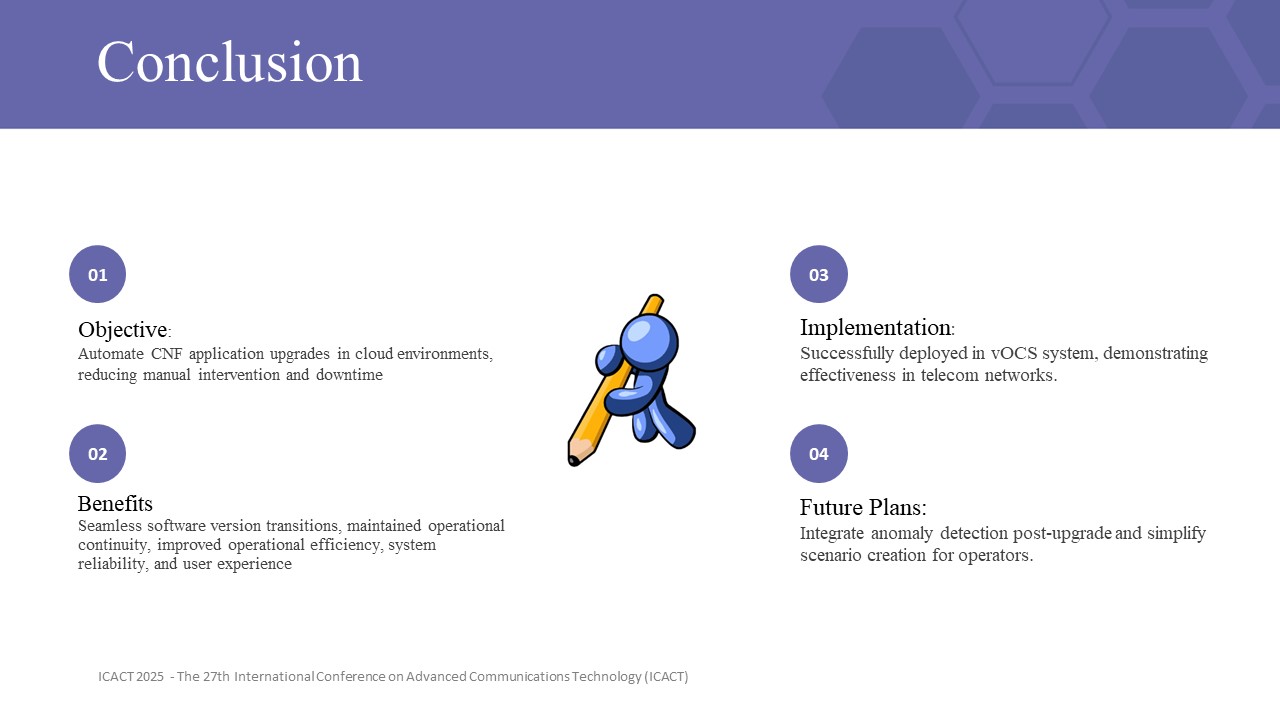 |
To conclude, our presentation highlighted the transformative potential of the Zero Touch solution for upgrading CNF applications in cloud computing environments. By eliminating manual intervention and minimizing downtime, this solution addresses the challenges of traditional upgrade methods that often disrupt services.
Its successful implementation in the our vOCS system has demonstrated significant improvements in efficiency, reliability, and user experience, proving its effectiveness in telecommunication networks.
Looking ahead, we aim to further refine this solution by incorporating advanced anomaly detection capabilities and simplifying scenario creation with minimal commands, ultimately optimizing the experience for system operators. For a deeper dive into the technical details, methodologies, and results, feel free to read the full paper that we have uploaded.
|
|
ICACT20250079 Slide.14
[Big slide for presentation]
|
Chrome Text-to-Speach Click!! |
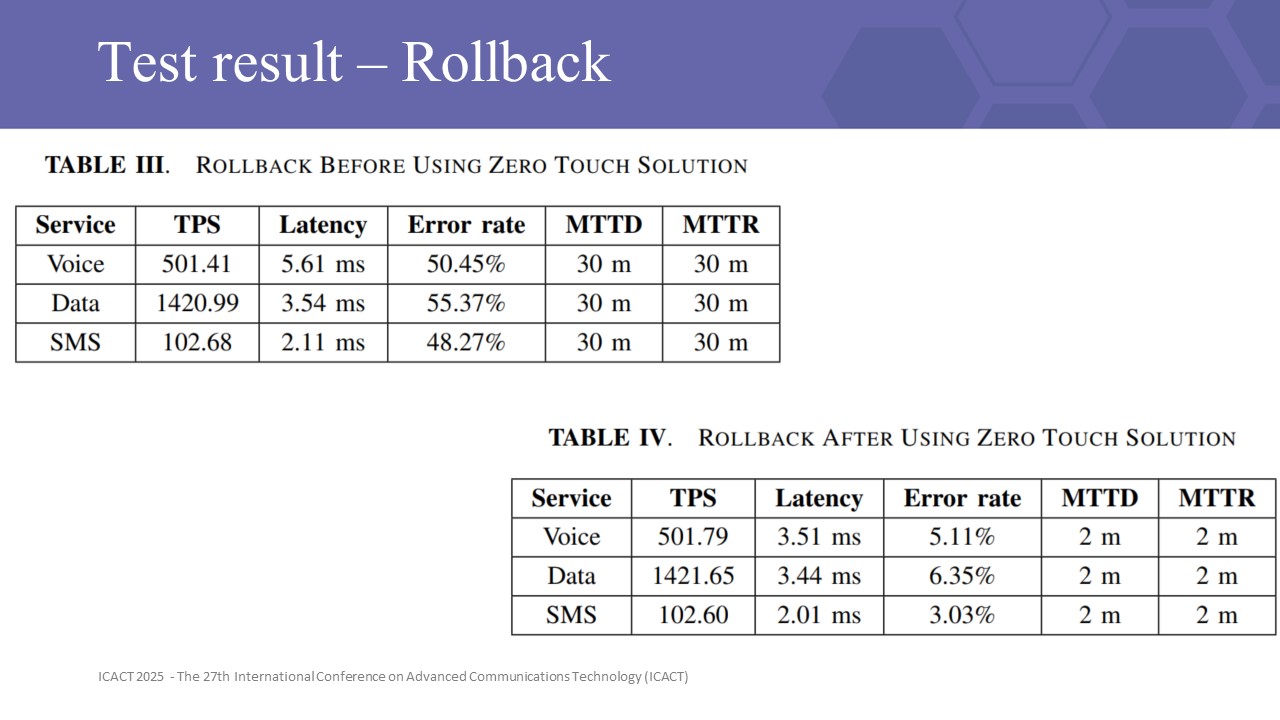 |
The results in table 3 and table 4 show a significant reduction in both latency and error rate across all services during the upgrade process. Specifically, before using the solution, the latency during the rollback of the Voice service was 5.61 ms, and the error rate was 50.45% – a fairly high figure. However, after applying the solution, latency and error rate decreased to just 3.51 ms and 5.11%, respectively. Additionally, in the rollback case, we also measured two more metrics: MTTD (Mean Time to Detection) and MTTR (Mean Time to Recovery).
|
|
ICACT20250079 Slide.13
[Big slide for presentation]
|
Chrome Text-to-Speach Click!! |
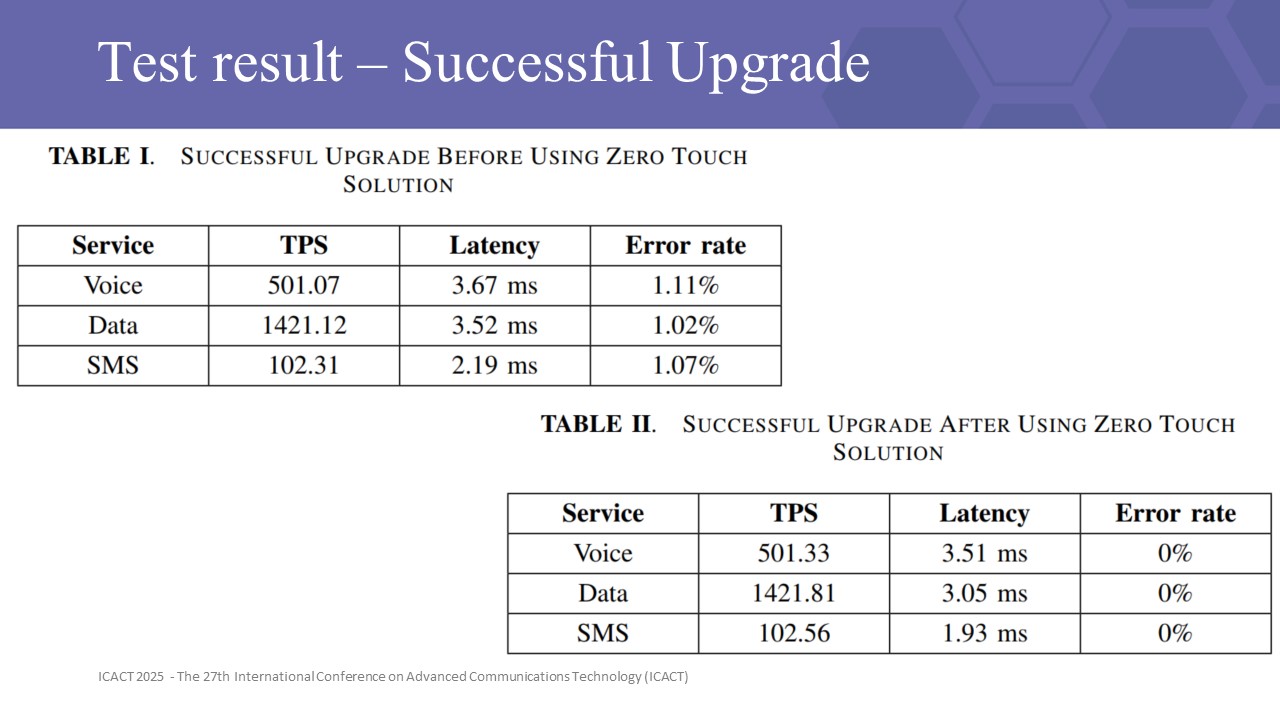 |
We used two test cases to evaluate the effectiveness of the solution.
Test case 1: successful upgrade:
The error rate dropped to 0% at all 3 service.
The latency is also reduce significantly.
|
|
ICACT20250079 Slide.12
[Big slide for presentation]
|
Chrome Text-to-Speach Click!! |
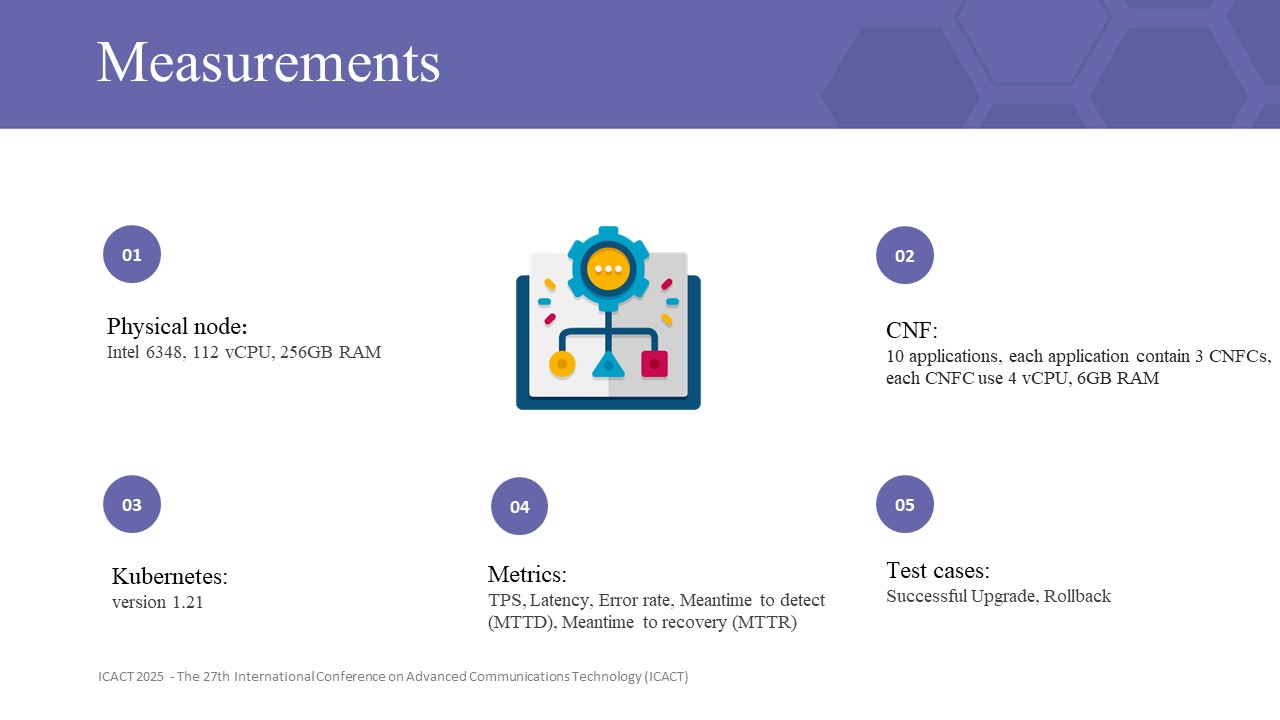 |
The conditions of the systems to measure:
01: Physical node: Intel 6348, 112 vCPU, 256GB RAM.
02: CNF: 10 applications, each application contain 3 CNFCs, each CNFC use 4 vCPU, 6GB RAM.
03: Kubernetes version 1.21
04: Metrics: TPS, Latency, Error rate, Meantime to detect (MTTD), Meantime to recovery (MTTR).
05: Test cases: Successful Upgrade, Rollback.
|
|
ICACT20250079 Slide.11
[Big slide for presentation]
|
Chrome Text-to-Speach Click!! |
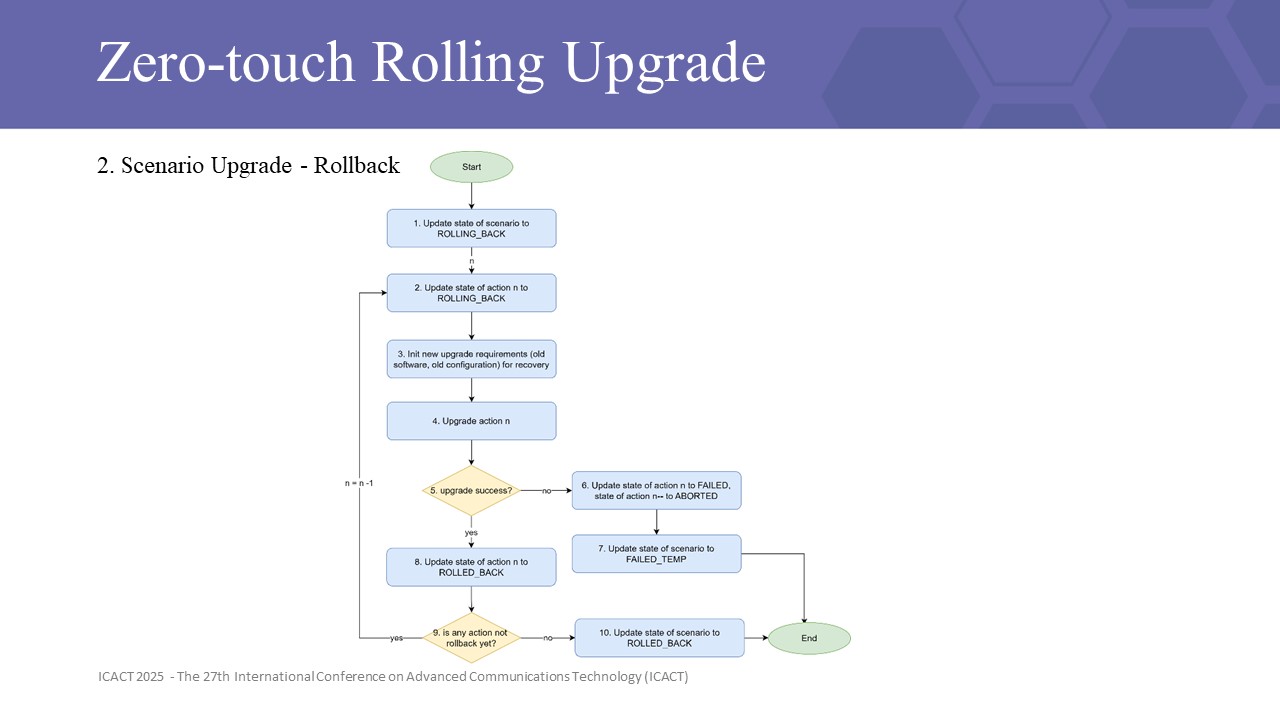 |
The activity flow of rolling-back:
First, the state of scenario update to ROLLING_BACK. With each action in scenario, do the following step:
1: Update stat of action to ROLLING_BACK.
2: Initiate new update requirement with old information to recovery.
3: Do update current action.
If success -> update action state to COMPLETED and continue with the next action is not roll-back yet, if there are no action left, the scenario state turn to ROLLED_BACK.
If don’t -> update state of this action to FAILED and the actions after change to ABORTED, state of scenario to FAILED_TEMP and end the scenario.
|
|
ICACT20250079 Slide.10
[Big slide for presentation]
|
Chrome Text-to-Speach Click!! |
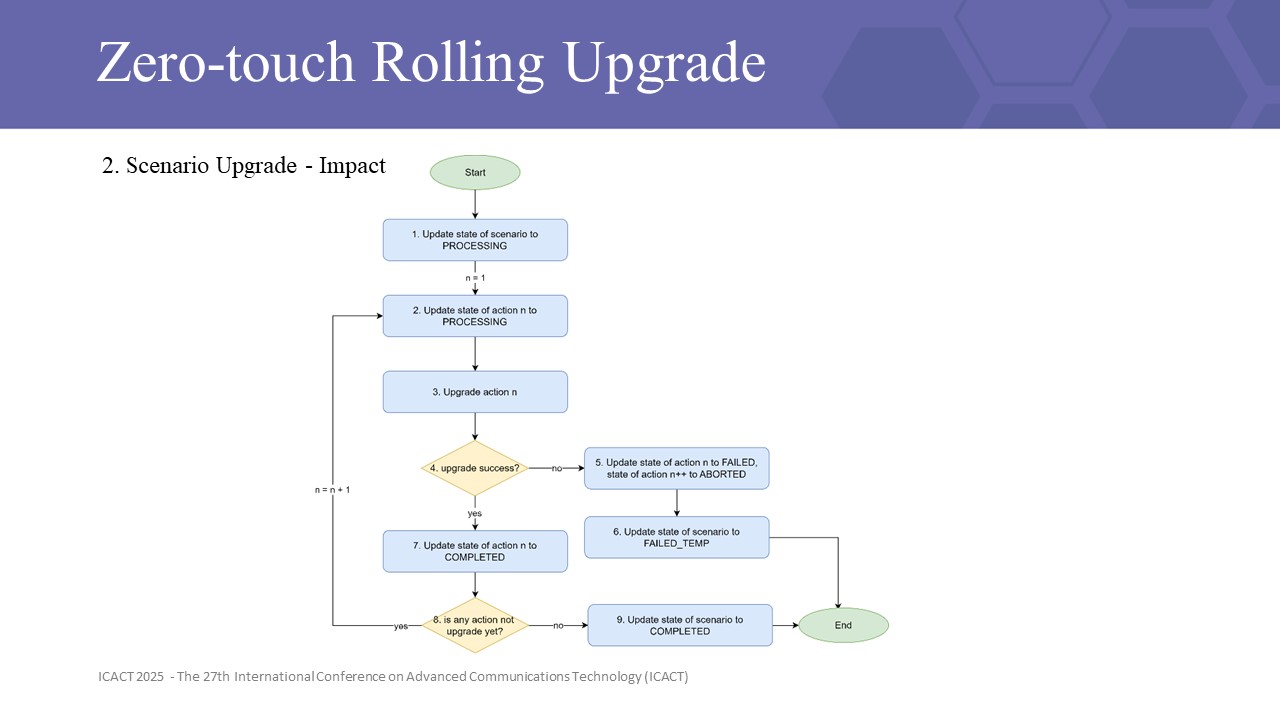 |
- First, start impact scenario. First, state of scenario turn to PROCESSING. With each action in scenario, do the following step:
+ 1: update state to PROCESSING.
+ 2: do upgrade action.
+ If success -> update state to COMPLETED and continue with the next action is not updated yet, if there are no action left the scenario state turn to COMPLETED.
+ If don’t -> update state of this action to FAILED and the actions after change to ABORTED, state of scenario to FAILED_TEMP and end the scenario
|
|
ICACT20250079 Slide.09
[Big slide for presentation]
|
Chrome Text-to-Speach Click!! |
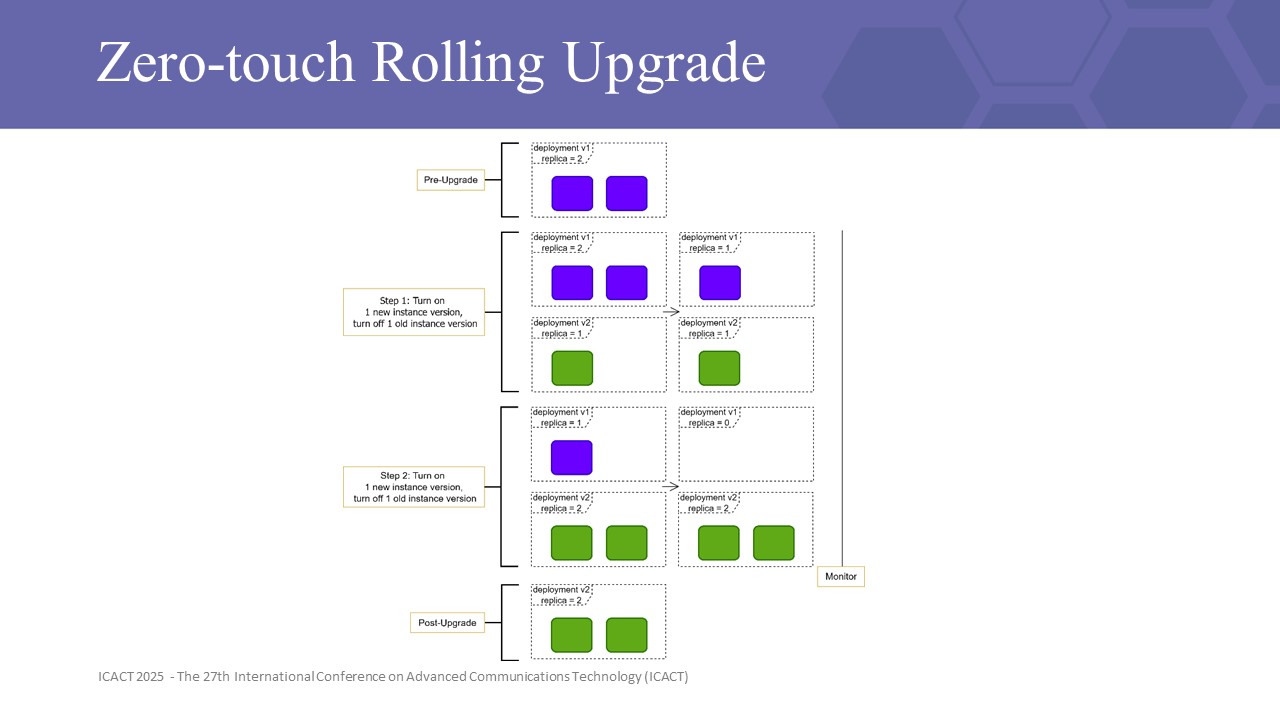 |
With the rolling upgrade method, new versions of the application are gradually deployed, while the old versions continue to run and handle requests. We offer two options:
The number of node is greater than the instances number, use rolling-out, active new instance following de-active old instance.
If the number of node is equal the instance number, use rolling-in, de-active old instance, active new instance.
This is A typical Rolling Upgrade with monitoring diagram.
Step 1: turn on 1 new instance version, and turn off 1 old instance version.
Step 2: turn on 1 new instance version, turn off 1 old instance version.
the required kpi metrics will be monitored through all 2 steps.
|
|
ICACT20250079 Slide.08
[Big slide for presentation]
|
Chrome Text-to-Speach Click!! |
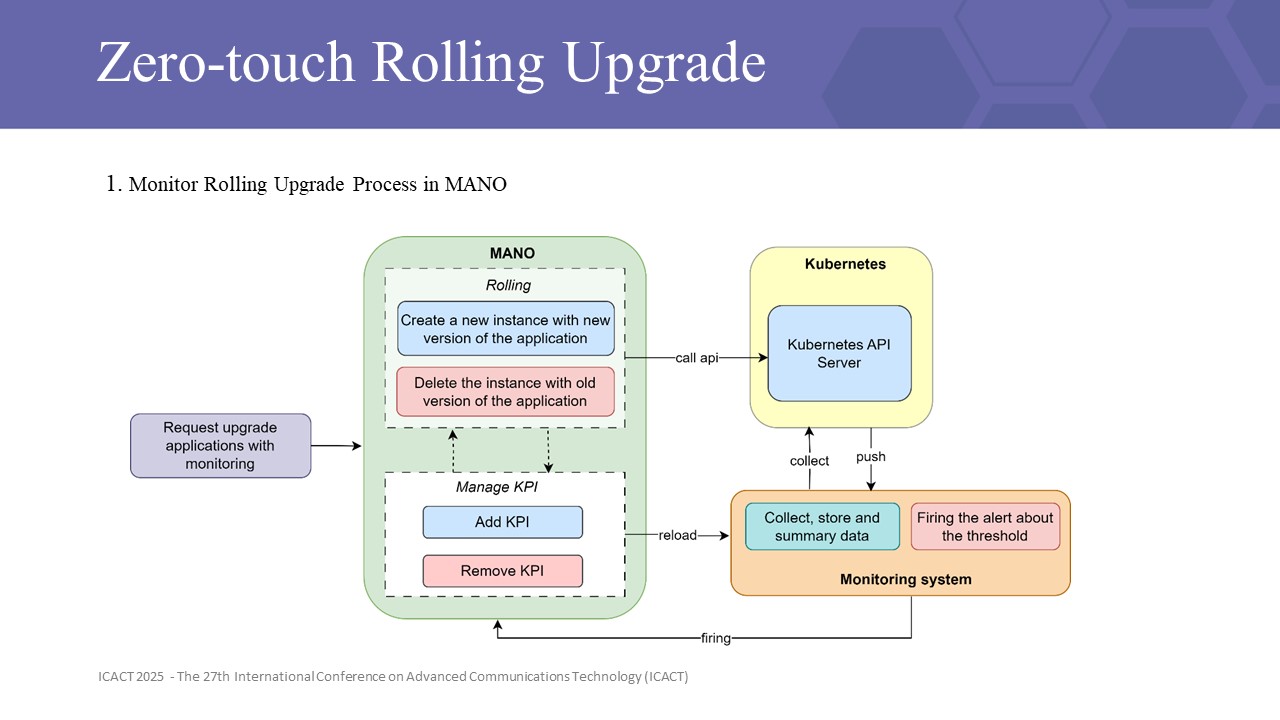 |
This is Monitor Rolling Upgrade Process in MANO.
The MANO system plays a crucial role in the application upgrade process by sending a trigger to the application when the upgrade is about to take place so the applications have time to prepare necessary steps to ensure user experience remain unaffected. Monitoring during the upgrade process involves overseeing the performance and operational metrics of the application during the upgrade. Each application can be monitored by one or more KPIs, and if any of these metrics exceed their thresholds, it is considered a failure and will be handled by rollback.
The KPI metrics will be added at the start of the upgrade to track newly activated application and will be deleted at the end of the process regardless the result.
The monitoring system has the duty to collect, store and summary the data and firing alert about the threshold for MANO.
During the upgrade process, if the new instances fail the health check or any anomalies are detected by the monitoring system, the upgrade will be halted.
|
|
ICACT20250079 Slide.07
[Big slide for presentation]
|
Chrome Text-to-Speach Click!! |
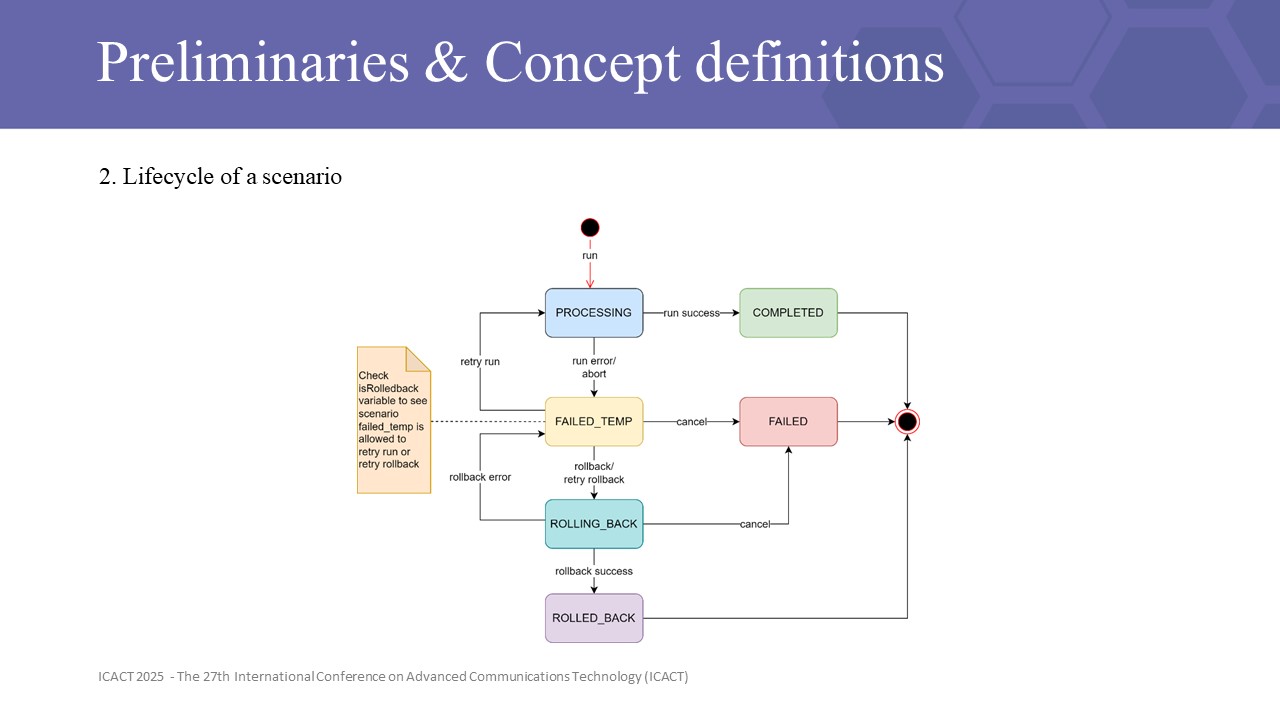 |
After a scenario is generate, it is ready to execute. There are two options: first, the scenario can be executed immediately (on-demand), and second, it can be scheduled for a future time (scheduled). Both remain the same execution process
A lifecycle of a scenario is presented in this diagram. When a scenario executed, the state turn to PROCESSING: if run success, the state is COMPLETED and the scenario ends. If there are any error or get aborted, the state is FAILED_TEMP. If we choose roll-back, the state is ROLLING_BACK, if rollback success -> the state is ROLLED_BACK, if don’t turn back to FAILED_TEMP. At the state FAILED_TEMP, if we choose to retry-run, the state is back to PROCESSSING, if we choose retry-rollback -> the state is ROLLING_BACK, if cancel -> the state update to FAILED.
|
|
ICACT20250079 Slide.06
[Big slide for presentation]
|
Chrome Text-to-Speach Click!! |
 |
- As mentioned above, each CNF consists of a group of related application, so when performing upgrades, operators often upgrade multiple application and require specific order. To automate the upgrade of applications upon request while making the automated upgrade process easily reusable, we have developed a data model that includes Templates and Scenarios.
A template contains a list of upgrade actions, where each action holds the upgrade information for a single application with basic details. The Scenario inherits from the Template, with each action adding specific details for the current upgrade time.
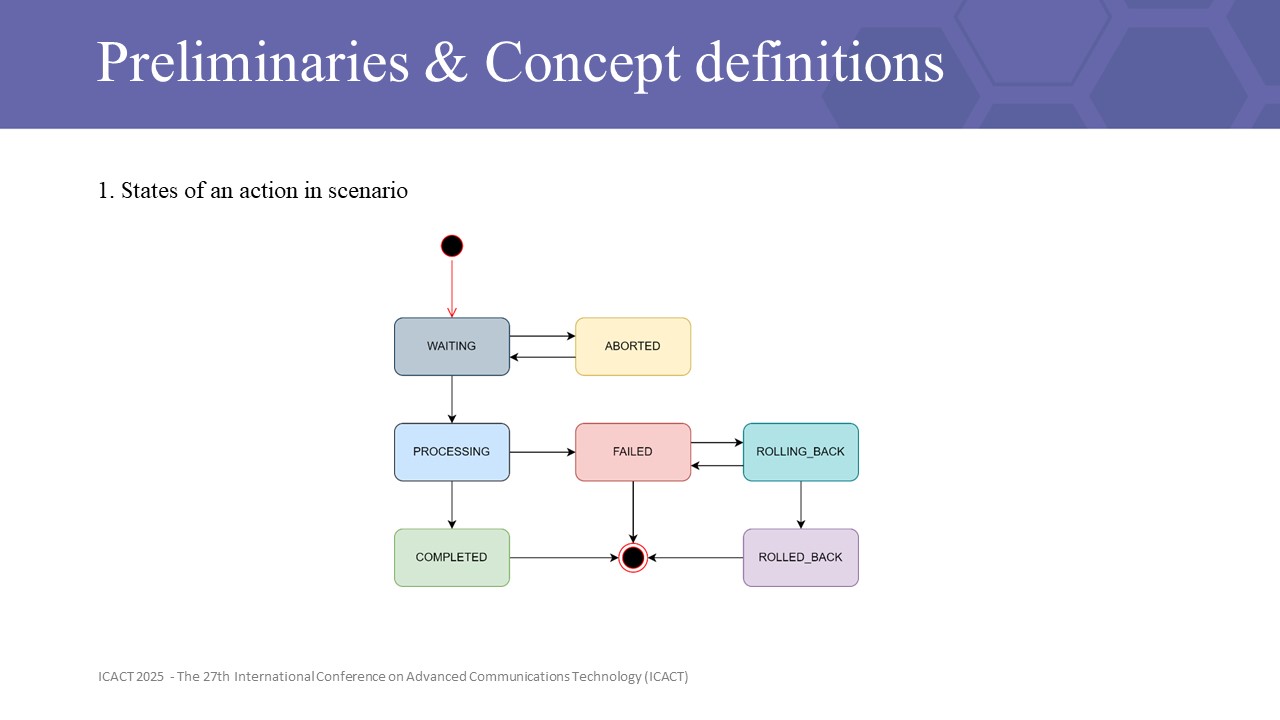
We define an upgrade action as an atomic action that can be executed at a single point in time. An upgrade action is always accompanied by a rollback action — a reverse operation. And each action has different state like in this diagram. An action is initiated with waiting state then when the action is execute, it is processing state. If success, the state turn into COMPLETED, if don’t turn to FAILED and start ROLLING_BACK; if rollback success, the state is ROLLED_BACK, if don’t turn to FAILED.
|
|
ICACT20250079 Slide.05
[Big slide for presentation]
|
Chrome Text-to-Speach Click!! |
 |
Before we dive into the main content, let’s take a moment to define some key terms and concepts.
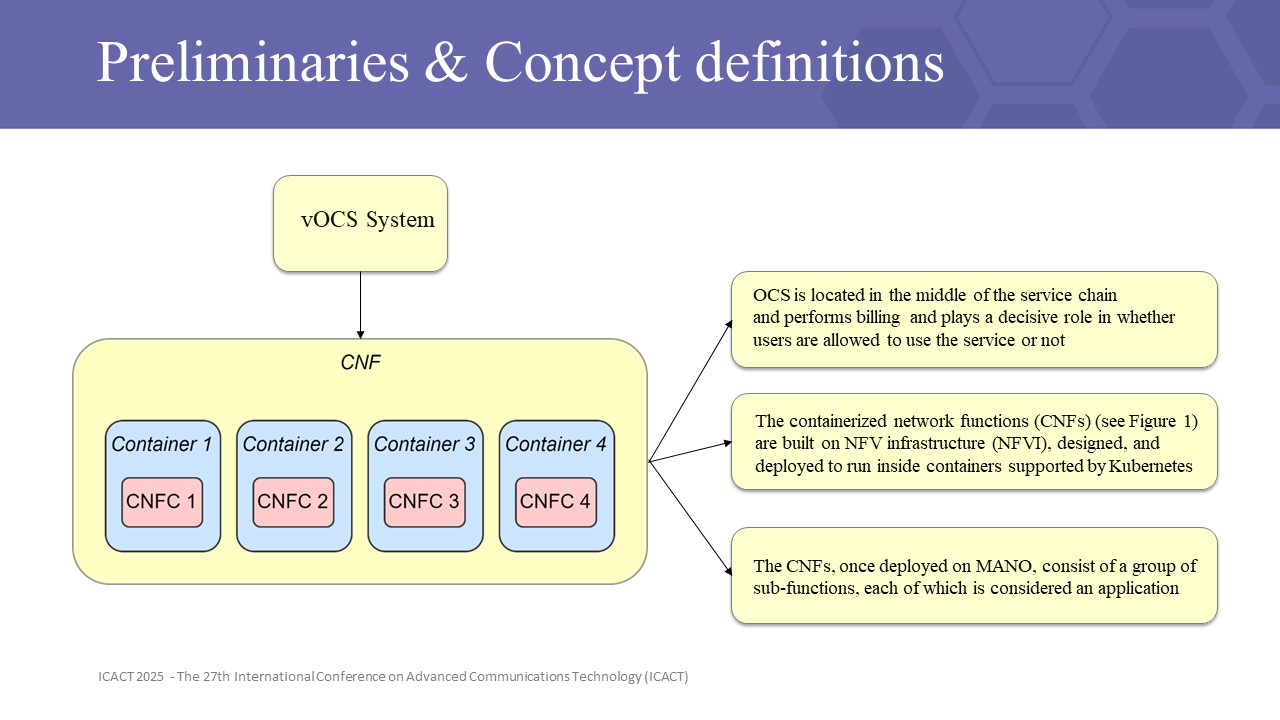
OCS stands for The online charging system. this is a system located in the middle of the service chain and performs billing and plays a decisive role in whether users are allowed to use the service or not.
The containerized network functions (CNFs) are built on NFV infrastructure (NFVI), designed, and deployed to run inside containers supported by Kubernetes.
The CNFs, once deployed on MANO - the management, automation, and network orchestration, consist of a group of sub-functions, each of which is considered an application. Then application information, the number of instances, and other details to support the management, scaling, upgrading, and monitoring of applications will be stored on MANO.
|
|
ICACT20250079 Slide.04
[Big slide for presentation]
|
Chrome Text-to-Speach Click!! |
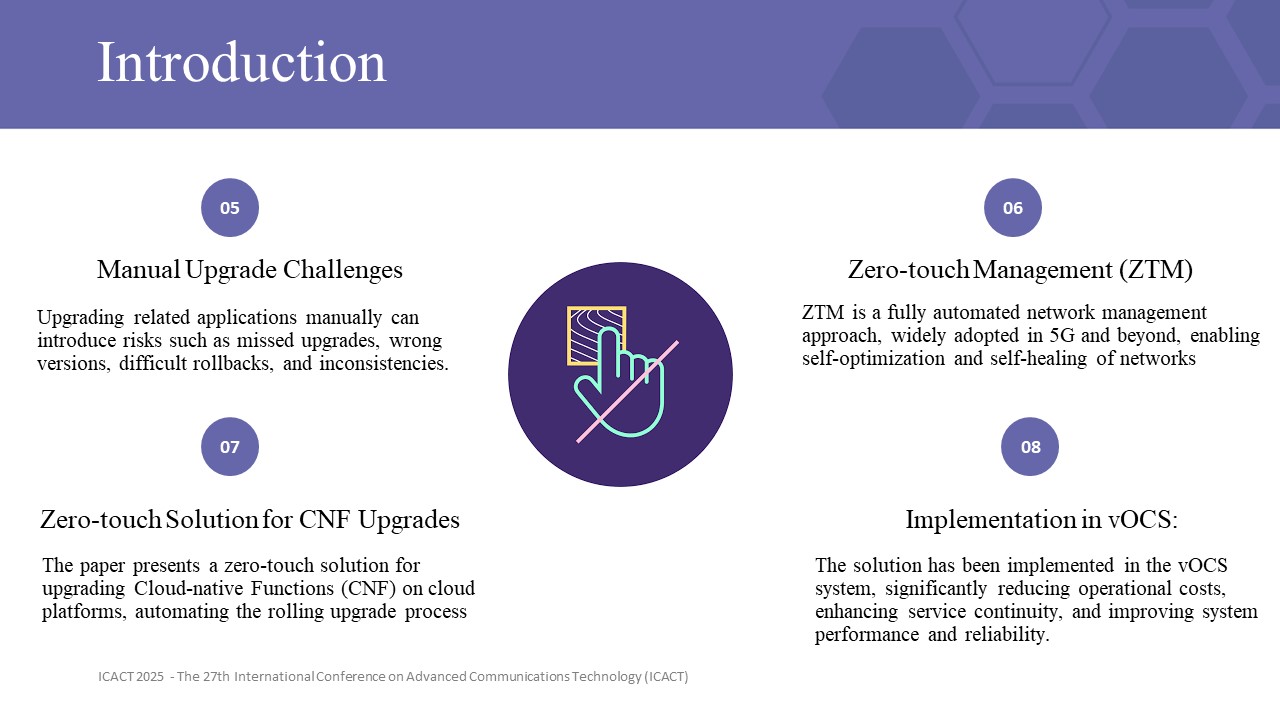 |
05: Additionally, each time an upgrade is performed, the operator will usually upgrade a group of related applications. If done manually can introduce risks such as missed upgrades, wrong versions, difficult rollbacks, and inconsistencies. Therefore, automation is essential due to the large scale of the system.
06: ZTM is a fully automated network management approach, widely adopted in 5G and beyond, enabling self-optimization and self-healing of networks.
07: The paper presents a zero-touch solution for upgrading Cloud-native Functions (CNF) on cloud platforms, automating the rolling upgrade process. Our zero-touch solution for upgrading CNF is only a small part of the ZTM approach; however, it has already brought certain efficiencies.
08: The solution has been implemented in the vOCS system, significantly reducing operational costs, enhancing service continuity, and improving system performance and reliability.
|
|
ICACT20250079 Slide.03
[Big slide for presentation]
|
Chrome Text-to-Speach Click!! |
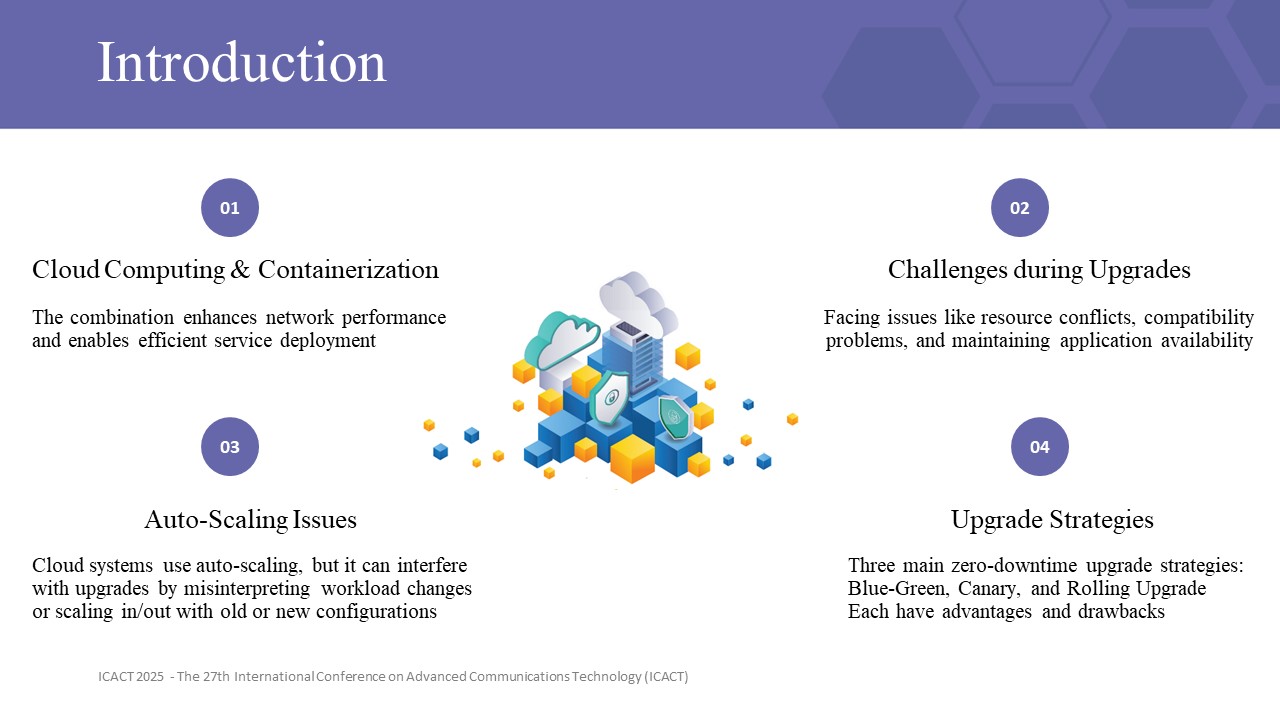 |
01: Cloud Computing and Containerization are two key technologies that have revolutionized how software is developed, deployed, and managed. The combination of this two technologies enhances network performance and enables efficient service deployment.
02: In that trend, our company’s systems is transforming to containerization technology, designed to serve up to 100k concurrent users. With the characteristics of a telecommunications system, services provided to users must frequently be updated to align with business needs, and ensuring service upgrades without interruption is a top priority. But there are many challengers during upgrades such as like resource conflicts, compatibility problems, and maintaining application availability.
03: additional, Cloud systems use auto-scaling, but it can interfere with upgrades by misinterpreting workload changes or scaling in/out with old or new configurations.
04: So, in order to achieve zero-downtime upgrades, there are 3 main strategies: Blue-Green, Canary, and Rolling Upgrade Each have advantages and drawbacks.
|
|
ICACT20250079 Slide.02
[Big slide for presentation]
|
Chrome Text-to-Speach Click!! |
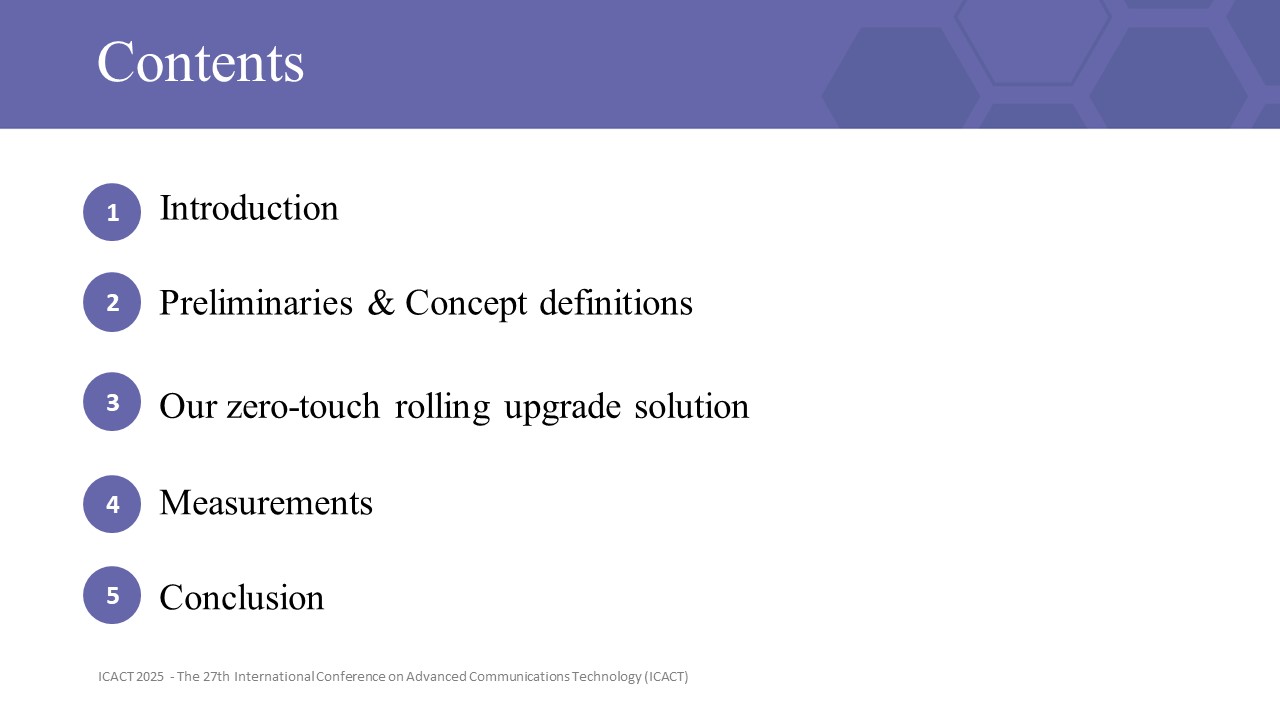 |
- Here is an overview of the key sections we’ll cover in today’ presentation. It will help you follow along and understand the flow of the discussion.
The presentation is divided in 5 part.
Part 1: the introduction.
Part 2: the preliminaries and concept definitions.
Part 3: the solution for the problems.
Part 4: Measurements.
Part 5: the conclusion.
Let’s dive in the introduction section.
|
|
ICACT20250079 Slide.01
[Big slide for presentation]
|
Chrome Text-to-Speach Click!! |
 |
Hi everybody, my name is Thao Phuong Do Hoang. For ICACT 2025, our presentation today is about a solution for upgrading applications in cloud computing environments., that we called Zero touch rolling upgrade Cloud-native network functions
|
| |